DTG White Ink Underbase: Opacity, Detail, and Clean Dark-Garment Prints
A DTG white ink underbase is the foundation that makes color look bright on dark garments. When it is dialed in, you get solid opacity, crisp detail, and repeatable results. When it is off, you get halos, patchy whites, muddy colors, and reprints.
This guide is for DTG operators printing dark shirts who want better underbase performance. You will learn what the DTG white ink underbase is doing and how core settings like choke and highlight white actually behave. Moreover, you will learn how to troubleshoot the most common DTG white ink problems and which maintenance habits protect quality.
Printing on dark shirts: Why the DTG white ink underbase exists
Printing on dark shirts is fundamentally different from printing on light ones. Your CMYK inks are not opaque enough to “beat” a black or navy fabric. Because of that, the underbase acts like a controlled, opaque layer that color can sit on top of.
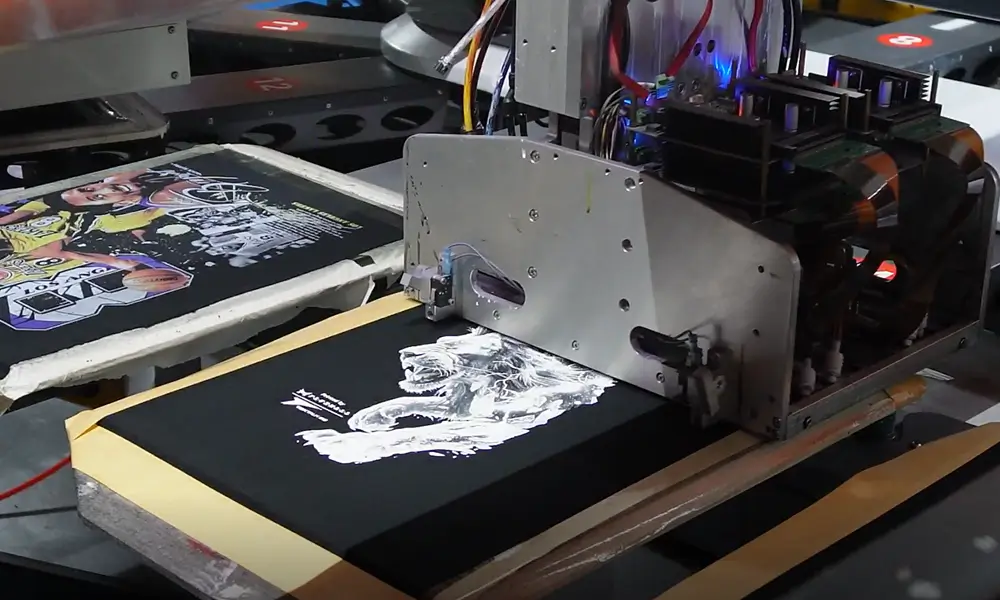
Think of the underbase as three jobs in one:
- Opacity: creates a bright canvas so colors don’t look dull.
- Edge control: keeps small text and fine lines from sinking into the fabric.
- Consistency: reduces “shirt-to-shirt” variation when the workflow is stable.
If you want a deeper breakdown of how underbase thickness, layering, and curing interact (especially in multi-layer DTG and hybrid workflows), Fluxmall’s “Mastering White Underbase Control” tutorial is a strong reference.
DTG White Ink underbase settings: The 5 concepts that change results fast
Most “DTG white ink underbase settings” live in your RIP, not your design file. The key isn’t memorizing a perfect preset. It is understanding what each lever changes on fabric, then testing with a simple control file.
For instance, here are the concepts that matter most:
Underbase density (how much white ink is laid down)
Higher density boosts opacity but can reduce detail, increase texture, and raise the risk of curing or hand-feel problems.
Number of layers or passes
More layers can improve coverage but also amplify any instability: nozzle issues, registration drift, or inconsistent pretreatment.
Interpass delay or dry time between layers
If layers are stacked too wet, you can get bleeding, rough texture, and loss of sharpness. If you pause too long, then you can create bonding inconsistencies depending on your setup.
Print order (white first, then color)
Most dark garment workflows rely on a stable white base that CMYK can sit on, which is why underbase control is central to vibrancy.
Resolution vs speed tradeoff
Higher resolution can hold detail better, but only if your underbase is stable and your maintenance is consistent. Fluxmall’s RIP guide explains how RIP-level settings influence white underbase sharpness and outlines, including choke.
Underbase choke: How to remove white outlines without losing detail
Underbase choke is the control that slightly shrinks the white underbase relative to the top color layer. The goal is simple: prevent a visible white “halo” around the edges of your design.
In production, choke is usually the first setting to adjust when you see a white outline, but it’s also easy to overdo.
A practical way to dial it in:
Start with a small choke value, print a test with tiny text and a sharp shape edge, then increase in small steps until the halo disappears. If you choke too much, you’ll notice colored edges look weak, fine details break, or dark fabric starts peeking through at borders.
If your shop wants a more advanced, repeatable approach, including underbase bleed or spread strategies and layering logic, then the Fluxmall underbase control tutorial goes into the “why” behind these interactions.
Highlight white: When to use it (and when to skip it)
Highlight white is a secondary white layer placed on top of color to increase “pop,” especially in areas you want to look brighter or more dimensional.
Used well, highlight white can:
- Improve perceived brightness on certain colors.
- Add punch to high-contrast graphics.
- Make specific design elements stand out.
Used poorly, it can make prints feel heavy, reduce fine detail, and increase the chance of curing-related issues (because you’re adding more ink mass).
A production-friendly rule: use highlight white deliberately, not globally. If everything is highlighted, nothing is, and then you will pay for it in texture, cure sensitivity, and white ink consumption.
DTG white ink underbase: Troubleshooting the most common white problems
When white is failing, avoid changing five settings at once. Pick one symptom, make one adjustment, and log the result. The table below covers the fastest “first move” fixes.
| Symptoms on dark garments | Most likely cause | Change this first |
|---|---|---|
| White looks patchy or has “holes” in the underbase. | Nozzle dropouts, unstable white flow, or uneven pretreatment. | Run nozzle check and clean; verify pretreatment uniformity. |
| White edges show a halo. | Choke too low or none. | Increase underbase choke slightly. |
| Fine details fill in/look blurry. | Underbase too heavy or too wet between layers. | Reduce underbase density; add interpass delay. |
| Colors look muddy/dull even with “enough white.” | Underbase not stable (coverage inconsistency). | Stabilize the white layer first, then re-profile the color. |
| White feels rough or “plastic.” | Too much white ink or the white highlight is too strong. | Reduce density; limit highlight white coverage. |
| Wash durability problems | Underbase and ink not cured consistently, or pretreat issues. | Validate the cure process and pretreatment SOP. |
If you suspect pretreatment is the root cause, use Fluxmall’s DTG Pretreatment Best Practices Guide to tighten application and curing discipline. Usually, this root cause is when whites vary by operator or by garment batch.
White ink maintenance: Habits that protect opacity and detail
White ink maintenance matters more than any single “magic” setting because white ink is the most sensitive part of DTG printing on dark shirts. If white flow becomes unstable, your underbase becomes unstable. Then choke, highlight, and profiles can’t save you.
What protects underbase quality over time:
Daily consistency beats occasional deep cleaning.
A short, repeatable routine (nozzle checks, cleaning the right contact points, and keeping the ink path healthy) prevents the slow drift that turns into “suddenly we can’t print darks.”
Use the right cleaning chemistry.
Fluxmall’s guide on digital cleaning solutions explains why proper cleaning fluid is designed to dissolve ink residue without damaging components. Something that water/alcohol shortcuts can’t reliably do in production.
Prefer systems that reduce white settling risk (when scaling).
Some production DTG platforms emphasize white-ink circulation/management to reduce settling and maintenance burden.
And one reality check: maintenance protects quality only when it’s scheduled like a production station. It should not be treated as “something we do after we’re done printing.”
When you’re ready to scale beyond “operator skill”
If your operation is moving into POD-scale dark-garment volume, the most reliable way to stabilize underbase performance is often workflow design, not constant setting tweaks. Textalk’s POD line concept is built around a controlled sequence (pretreatment → white → color) to reduce variability and labor dependence.